


|
| |
| Welcome to myHanse.com the forum for Hanse Yachts owners throughout the world. | |
508: Monitoring at charttable |
Post Reply 
|
| Author | |
tobo2 
Captain 
Joined: 14 February 2014 Location: Switzerland Status: Offline Points: 303 |
 Post Options Post Options
 Thanks(0) Thanks(0)
 Quote Reply Quote Reply
 Topic: 508: Monitoring at charttable Topic: 508: Monitoring at charttablePosted: 03 June 2019 at 09:06 |
|
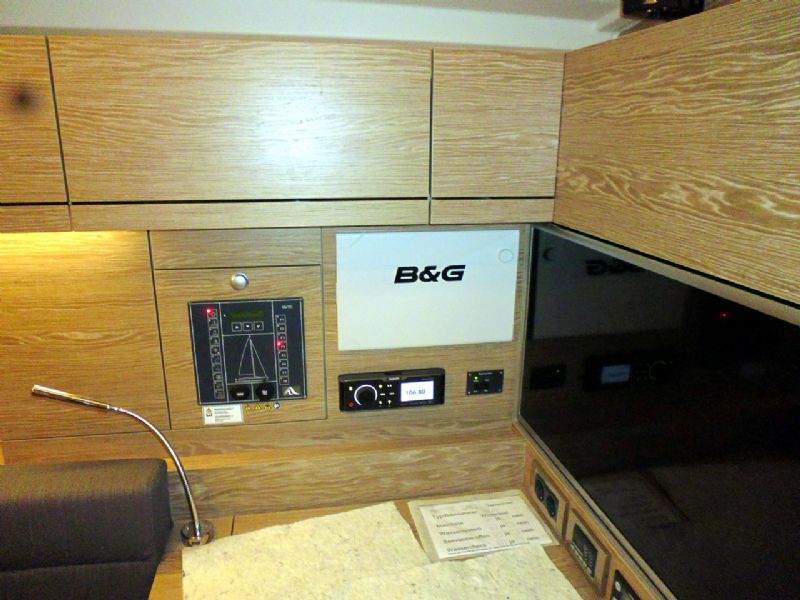
The 508 is offering an optional LED-TV on the right side of the chart table. Besides that it is not in front of the person sitting on the chart table - ergonmically stupid - it its not even clear, wether it can mirror the Zeus plotter (s) image. Does anybody have experiences? The optional 12' Zeus for € 3'700 is not really an option to show multimedia contents. A movable 19' monitor would be my favourite option. (So you can use the pigeon holes on the right side).
 Edited by tobo2 - 03 June 2019 at 09:09 |
|
 |
|
|
Luna342
Sub Lieutenant 

Joined: 22 September 2016 Location: Baltimore Status: Offline Points: 11 |
Post Options
Thanks(0)
Quote Reply
Posted: 03 June 2019 at 14:22 |
|
Should be an easy setup, the Zeus 12" includes an HDMI output for an External Monitor.
|
|
|
|
|
tobo2
Captain
Joined: 14 February 2014 Location: Switzerland Status: Offline Points: 303 |
Post Options
Thanks(0)
Quote Reply
Posted: 03 June 2019 at 14:39 |
|
... but I don't want to spend € 3700 for a B&G Plotter AND another € 1000 for the monitor. I also don't want to do an additiontal cabeling (HDMI) from the cockpit plotters to the monitor when we have wifi; it just doesn't make sense! (The pic is not my boat, it's just an expensive example setup).
Edited by tobo2 - 03 June 2019 at 14:41 |
|
|
|
|
Fendant
Admiral 
Joined: 03 November 2012 Location: Switzerland Status: Offline Points: 1671 |
Post Options
Thanks(0)
Quote Reply
Posted: 03 June 2019 at 21:18 |
|
The Zeus has a wireless built in. Just buy a suitable tablet (Aldi springs to y mind ), download the Simrad Link App and you have a perfect mirror/twin of your cockpit display without any cabling hazzle.
Edited by Fendant - 04 June 2019 at 06:18 |
|
|
Frank
|
|
|
|
|
DotandDash
Sub Lieutenant

Joined: 03 August 2016 Location: Annapolis Status: Offline Points: 17 |
Post Options
Thanks(0)
Quote Reply
Posted: 04 June 2019 at 12:29 |
|
On our 455, we have a 12v Majestic 32” TV mounted on the bulkhead between the saloon and master cabin. I followed some Youtube videos and converted a 2nd generation Apple TV to 12v and hooked it to the TV via HDMI. I can mirror an iPad display showing the Zeus chartplotter up to the TV this way.
|
|
|
|
|
tobo2
Captain
Joined: 14 February 2014 Location: Switzerland Status: Offline Points: 303 |
Post Options
Thanks(0)
Quote Reply
Posted: 04 June 2019 at 14:52 |
|
To be honest, I'm not a tablet fan, I prefer to work with my laptop. Besides that I'm looking for a monitor that can be viewed by the whole crew sitting in the saloon, 19'-22' minimum. The plotter image can also be brought to a smart TV by bluetooth via the smartphone B&G app. (less hardware, less murphy's law)
Edited by tobo2 - 04 June 2019 at 14:53 |
|
|
|
|
Black Diamond
Admiral

Joined: 24 October 2015 Location: Newport, RI, US Status: Offline Points: 1275 |
Post Options
Thanks(0)
Quote Reply
Posted: 04 June 2019 at 15:05 |
|
If you want to use GOFREE as your nav station technology, you need to see how the ZEUS was wired at the factory. Powering up the electronics might not do anything with GOFREE unless a specific ZEUS is powered up. As I recall, there is a "yellow wire" coming out of the ZEUS that supports a "power one, power all" kind of behavior and if its in the wrong place that, and wireless get problematic. For example, on my boat, the initial configuration had one of my two ZEUS cockpit displays controlling the GOFREE wireless. I had to actually go into the cockpit, power up the port display, and then I could control that or the other 2 ZEUS devices. You can fix it, but be ready to look at the above to make it work.
|
|
|
Rick
S/V Black Diamond Hanse 575 Build #192, Hull# 161 Newport, RI |
|
|
|
|
Post Reply
|
|
| Tweet |
| Forum Jump | Forum Permissions You cannot post new topics in this forum You cannot reply to topics in this forum You cannot delete your posts in this forum You cannot edit your posts in this forum You cannot create polls in this forum You cannot vote in polls in this forum |
|
Links : www.hanseyachts.co.uk www.hanseyachts.com www.fjordboats.co.uk www.dehler.co.uk www.varianta.co.uk |


 Topic Options