Autopilot installation
Printed From: myHanse.com
Category: Hints & Tips
Forum Name: 345/348
Forum Description: 345/348 Hints, Tips and News
URL: https://www.myhanse.com/forum_posts.asp?TID=12567
Printed Date: 27 March 2026 at 03:41
Software Version: Web Wiz Forums 12.06 - https://www.webwizforums.com
Topic: Autopilot installation
Posted By: Luismoed
Subject: Autopilot installation
Date Posted: 03 March 2021 at 22:41
|
Hi, After an unsuccessful tentative to get a professional to install a autopilot on my Hanse 345 I decided to give it a go myself. that being said I do have a few questions that I hope someone could give me helping hand! 1) Location of the NAC-2 computer: I've found a thread that spoke about the fluxgate compass location (thank you for the posts) but i didn't find anything about the NAC box position. My concern here is the distance the box needs to be from the power source and the distance from the Direct Drive motor (is voltage drop an issue). 2) I will use a Jefa DD-1 drive, I read in the installation manual to set the electronics to reversible drive. and then I read something about clutch engagement. the question is that on the NAC installation manual they don't seem to draw the wiring for the clutch on the reversible drive. I assume that I can go ahead and connect anyway. Correct? 3) standby switch: the NAC seems to have a hardwired auto/standby switch. I will have the controls installed on the NMEA either via specific control unit. do I need to care for the hardwired (flagged as optional on the manual) or can I assume the NMEA bus will control everything? 4) power distribution board. I don't have the drawings from the power board, so I am really not sure and uncomfortable on how to connect the NAC to the main power (12v). does anyone have a schematic of what is going where? I am currently unable to go to the boat due to lockdown in UK. My plan is to order the kit in the next few days (all but the draglink, which I cannot measure in the next few days), so does anyone have any final tips/recommendations before I place the order? The shopping list is: NAC 2 (pack with RF, computer, cables, fluxgate compass, etc) DD1 triton 2 autopilot controller draglink (after i measure it). thanks for any input! Luis
|
Replies:
Posted By: CrocDundee
Date Posted: 04 March 2021 at 18:11
|
We are happy with our Simrad autopilot on our 345, so support your solution and planning. Below is photograph of our AP12 in the starboard locker. Our fluxgate compass is in the aft starboard locker floor. Sorry we do not have any wiring or network diagrams to hand, or access to the boat at present. The AP does operate well by keypad and MFD for selecting the different mode. Really like the wind setting. I can probably find a picture of the DD1 installation at the rudder if you wish to see this too. Richard  ------------- Hanse 345 - Tenacious. Sailing on the Solent and now to the west coast of Scotland. |
Posted By: Luismoed
Date Posted: 04 March 2021 at 22:31
|
Hi Richard, Good to know that it is working fine, thanks for letting me know!  If you happen to find a picture of the DD1 installation that would be amazing. a follow up question. I do have a triton 1 on my boat. Do you happen to know if the autopilot controller alone is enough or if I also need to upgrade to the triton 2? thanks! Luis |
Posted By: Captain Cook
Date Posted: 05 March 2021 at 09:08
|
Hi Luis The installation drawings can be found on Jefa homepage and are included when you buy a drive. Jefa is available with help by email or telephone if you need it. Also use the search function here on myhanse. "Jefa DD1" will show 100 results. Many of the posts are about water inside the DD1. Important issues: 1) With rudder in middle position, the angle of draglink and arm should be 90 degrees. 2) Cover the wires with two plastic hoses (4-5 mm diameter inside), and apply sealing at the end. 3) Near the DD1 let the wires have a u form, so the water drips off, and not goes inside the DD1. 4) Mount the draglink in the inner arm hole, if the DD1 is delivered with 2 holes. 5) There is an alu plate embedded in the GFK, but use bolts with self-locking nuts instead. 6) Apply clear or black sealing all places where water may ingress. 7) As stated on the DD1: Never use a high-pressure cleaner.
A lot of autopilot computers are delivered without a “clutch” terminal. The
DD1 has 4 wires, two for power, and two for clutch. If you are not sure if your
computer is okay, phone Jefa and ask. Jefa may be able to deliver the DD1 with a cable that plugs into your network. Have fun with the installation. :Kjeld
------------- Freya H400 #27 (2006),2-cabin, 40HP 3JH4E, 3-blade Flexofold, Aries LiftUp Windvane, Exturn 300, Jefa DD1,Simrad NX40,Icom M603(VHF)+M802(SSB) |


Posted By: CrocDundee
Date Posted: 05 March 2021 at 23:18
My view, angle is a bit different. From the stern, I assume. 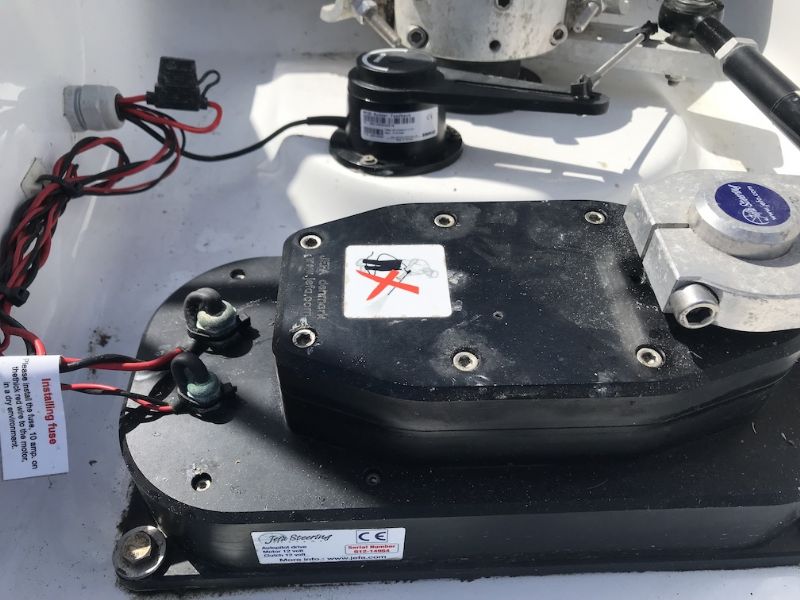 ------------- Hanse 345 - Tenacious. Sailing on the Solent and now to the west coast of Scotland. |
Posted By: Luismoed
Date Posted: 09 March 2021 at 23:08
|
Thanks for the pics. I checked before I posted, but I couldn't find those answers :) maybe I should hone my searching skills! the pics are very helpful! By any chance do you happen to know if the system will work only with the keypad controller and the triton 1? or should I really have the triton 2? I do know that triton 1 cannot "control" the NAC 2, but i am not sure the the triton 2 is needed if i order the keypad and link it on the system. thanks again! Luis |
Posted By: Luismoed
Date Posted: 09 March 2021 at 23:09
|
THanks for the Pics! they are also very helpful. Now i am struggling to order the kit... it seems they are not available in UK .... amazing.... Luis
|
Posted By: 350Bob
Date Posted: 10 March 2021 at 10:31
|
Hi Luis, I guess you have already tried Aztec Marine? I have always found them very helpful for spares. Bob ------------- H350 #205 |
Posted By: Luismoed
Date Posted: 10 March 2021 at 21:31
|
Thanks Bob, I tried them 3 times on this topic. Never received a reply to my mail nor a return from my voice mail. Which is actually strange, I have done services with them in the past and they were quite responsive and friendly. I guess this is the worst time of the year for them and likely my service is too small ;) I think this is likely the case, as I also call Hudson Marine but at least the guy there was able to politely decline my case saying they are too busy right now. that is the reason i decided to install it myself... Luis
|
Posted By: Luismoed
Date Posted: 03 April 2021 at 18:01
|
First of all Happy Easter and Happy boating if you are in UK. I was on the boat this weekend and started to think about placements of the DD. (pics below). I assume I will stick with the conventional one (rudder arm and DD arm pointing to the same side), although the other 2 seems to be more space efficient. the question I have in case someone can advise is about the rudder feedback unit. on Jefa site, they attach it to the DD itself, on several pics I see here and on internet, the feedback is attached to the main rudder arm (i.e. on Tenacious from the post above). I understand that the rudder arm and the DD arm move at different angular speed (at least according to Jefa website). so is there any config parameter to set where you attached the rudder feedback? I will post more pics as I install it. and yes... it needs a proper cleaning before I start  Thanks! Luis 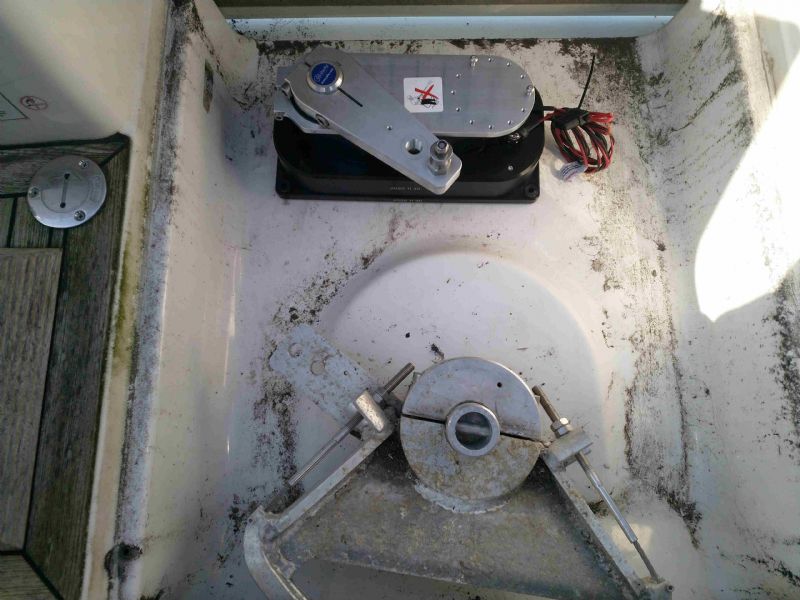 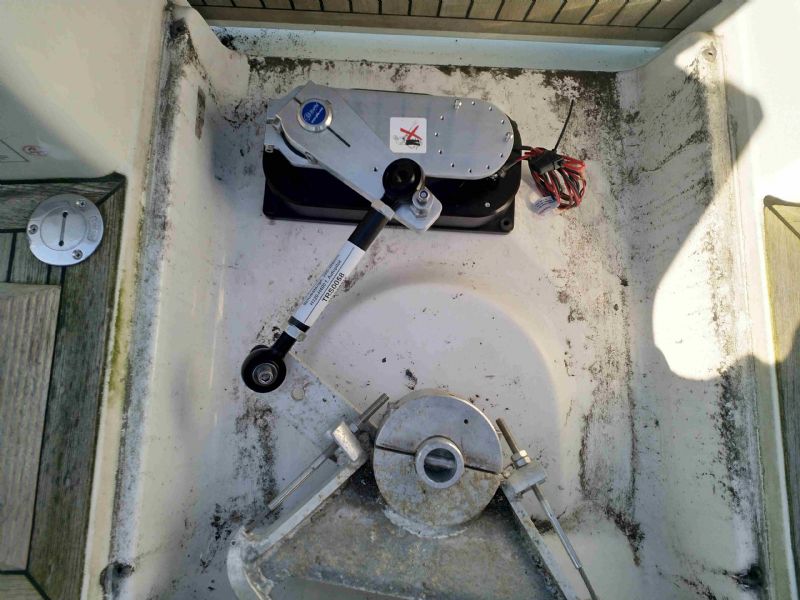 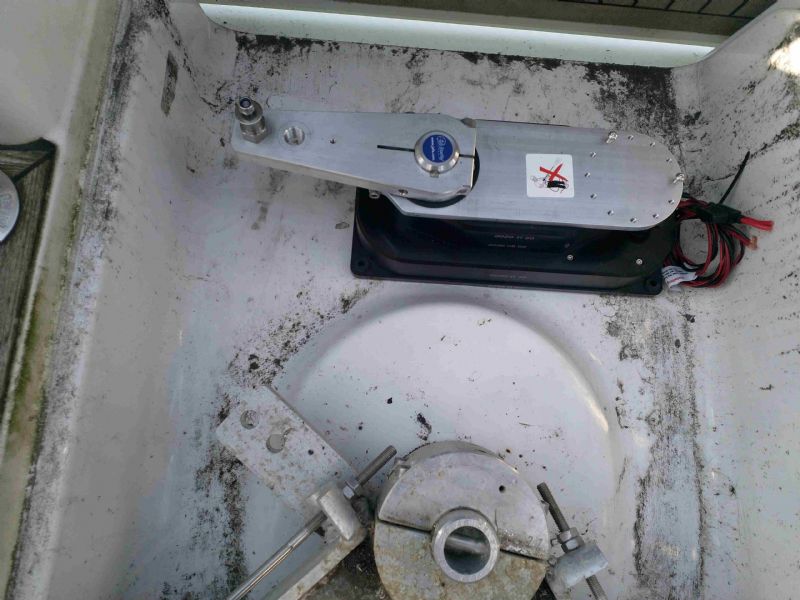 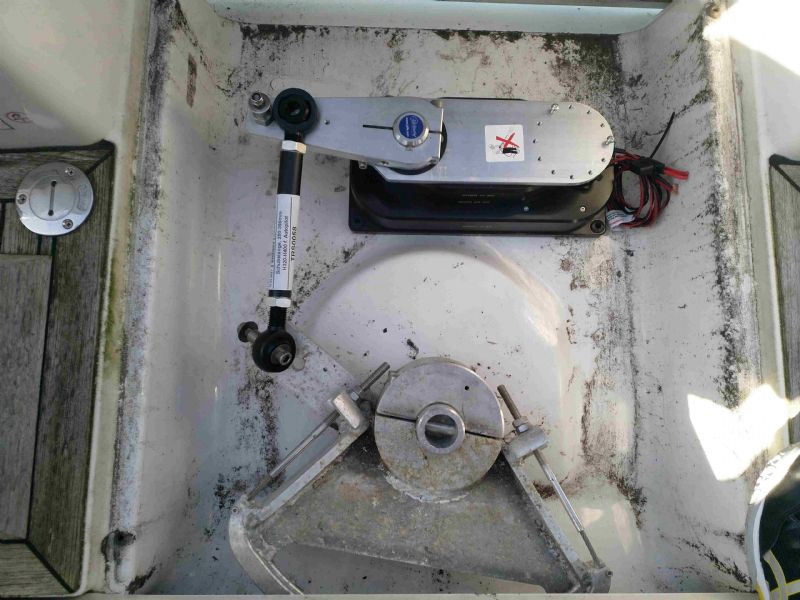 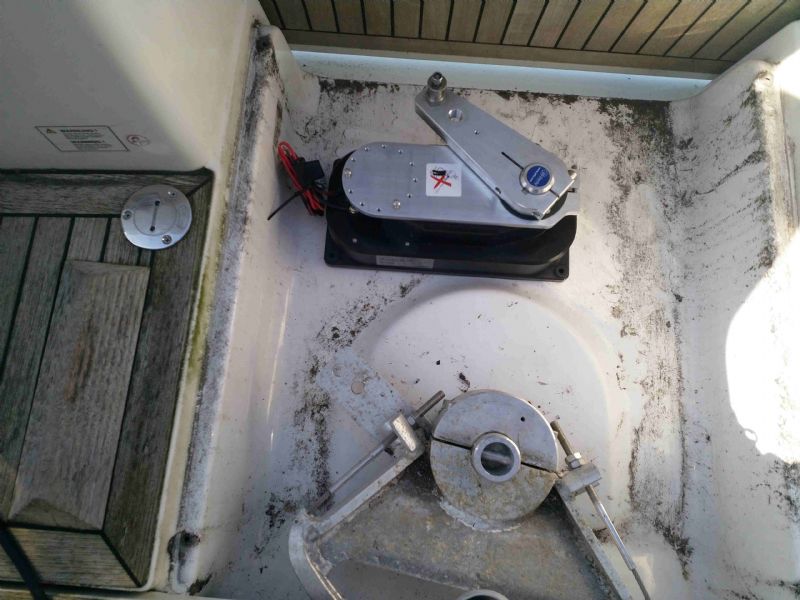 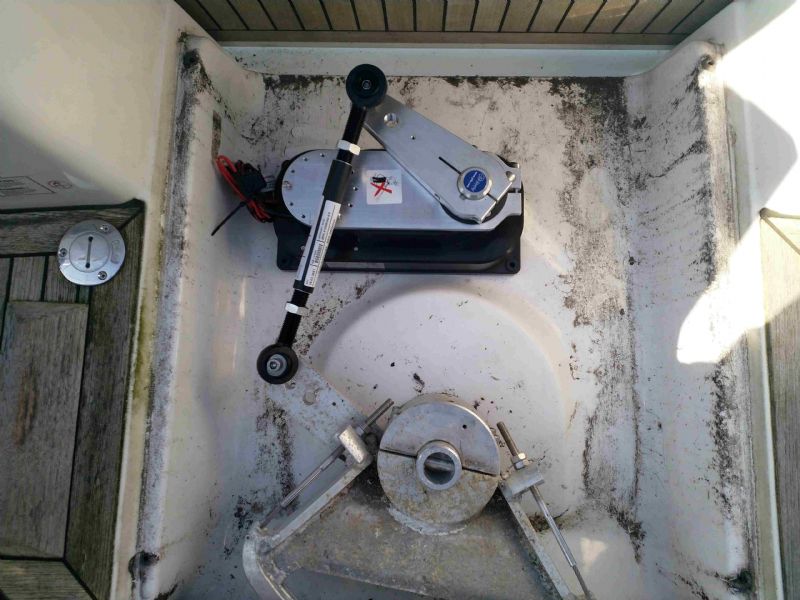 |
Posted By: tango
Date Posted: 03 April 2021 at 18:16
| I think the draglinks fixation should be on the first hole and not the second one as on the picture, and this for the DD1 and the bar sector |
Posted By: Arcadia
Date Posted: 03 April 2021 at 18:45
Hello Luismoed. I don’t believe it matters where you tie the feedback sensor. Even though you have two different angle speeds, this can be calibrated in your computer setup. I do want to point out some installation suggestions. First, I like the last option you posted (see my drawing). It offers the best mechanical setup with the arms moving together. Also, when you adjust your drag link, make sure that when your rudder is at centerline, the lever points are parallel (see drawing lines). This will insure that the power to port will be the same as starboard. And, the drag link should be as close to a right angle (90 degrees) as you can with the DD tiller arm. Good Luck! ------------- Leon / ARCADIA 2018 Hanse 588 Sag Harbor, NY |
Posted By: johanlavenius
Date Posted: 12 April 2021 at 12:47
|
On my way of installing the Jefa drive in my Hanse 348. I had small predrilled marks for where the unit should be mounted. Found them after drilling the first holes and cleaned. For me the draglink has to be mounted on the underside of the drive arm or else I cannot put the floor back on without it touching. It seems like this is how Jefa thinks it should be installed if you take a look at the buildcard at http://jefa.com/ftp/old_boat_spare_parts/Hanse/Hanse_345/Hanse_345_Buildcard.pdf" rel="nofollow - https://jefa.com/ftp/old_boat_spare_parts/Hanse/Hanse_345/Hanse_345_Buildcard.pdf Not sure if i should use the inner or outer whole on the drive arm.  |
Posted By: Captain Cook
Date Posted: 12 April 2021 at 21:09
|
uploads/729/Install-DD1.pdf" rel="nofollow - uploads/729/Install-DD1.pdf uploads/729/JEFA_steering_on_Hanse.pdf" rel="nofollow - uploads/729/JEFA_steering_on_Hanse.pdf uploads/729/Direct-Drive-Spec-Form.pdf" rel="nofollow - uploads/729/Direct-Drive-Spec-Form.pdf uploads/729/Motor_and_clutch_test_for_DD1.pdf" rel="nofollow - uploads/729/Motor_and_clutch_test_for_DD1.pdf Mount the draglink in the inner hole, like instructed by Jefa. On my H400 I cut off the end with the outer hole. Lots of drawings to be found at the Jefa homepage.  ------------- Freya H400 #27 (2006),2-cabin, 40HP 3JH4E, 3-blade Flexofold, Aries LiftUp Windvane, Exturn 300, Jefa DD1,Simrad NX40,Icom M603(VHF)+M802(SSB) |
Posted By: Luismoed
Date Posted: 17 April 2021 at 20:11
|
Thank you all for the help so far! I think I have my next question coming.... The electronics I bought was the NAC/Triton/etc. All b&g and all nmea connectors. Problem is, I can't find the nmea backbone.... I figure out is is a simnet backbone with specific cables (simnet-micro c). So, what should I do? Buy all new cables (which I would like to avoid) or buy one cable and daisy chain all of them on a single simnet cable? In that case, do I need to use a terminator in the end? Or a plug the last equipment on it? Or.. should I build a nmea back bone? In that case, how to connect them? (I would have 2 power lines, which I understand is trouble, or?) Thanks again! Luis
|
Posted By: JUTTER
Date Posted: 17 April 2021 at 22:18
|
Luis, the Simnet installation manual helped me understanding how the simnet works. Most of your questions should answered in that manual. http://www.chicagomarineelectronics.com/Simrad%20Documents/SimNet/Simnet-Install-Man.pdf" rel="nofollow - http://www.chicagomarineelectronics.com/Simrad%20Documents/SimNet/Simnet-Install-Man.pdf Claude ------------- JUTTER, Hanse 350#0256, 2010, deep keel, Zeeland |
Posted By: Luismoed
Date Posted: 17 April 2021 at 23:09
|
Thanks Claude, I've read it, but the examples they show is about to connect 1 NMEA device into a Simnet network. I am trying to understand if I can connect multiple equipments using the T drops and then connect that entire branch on the Simnet. Luis
|
Posted By: PekkaL
Date Posted: 19 April 2021 at 06:59
|
Simnet being NMEA 2000 with speacial connectors I do not think you can add multiple devices to a standard T-connector. You would need a 'Multi Port Box' for that if I understand Maretron correctly, see https://www.maretron.com/products/pdf/Network%20Installation%20Guide.pdf" rel="nofollow - https://www.maretron.com/products/pdf/Network%20Installation%20Guide.pdf ------------- Pekka Leppanen, "Vedette" |
Posted By: Luismoed
Date Posted: 08 June 2021 at 08:49
|
Hello again, After a very long wait for the cables from boatoon, they finally arrived! so i am moving to the final part of the installation this weekend (pictures to follow). I do have another question thou :( Due to the size of the underfloor compartment, I would be best served by installing the ruder feedback unit upside down (will use the plate on the DD, but mount the unit on the bottom side). which basically means that the rudder and DD arm will move (i.e.) clockwise, while the rudder feedback unit will move counter-clockwise. is that a problem? or is it something that i can configure on the triton 2 / autopilot setup? any ideas? thanks! Luis |
Posted By: Luismoed
Date Posted: 13 June 2021 at 18:37
|
Hello, Just to share that I finish the AP/DD installation. the final result is on the pic. I couldn't have the DD-arm and tiller-arm at the exact positions, but it was the closest I could do in the space available on H345. thank you to everyone that help me with your inputs and suggestions!  Luis
|
Posted By: iemand
Date Posted: 25 June 2021 at 20:26
|
I am considering to change the AP on our Hanse 370 from an old AC20 to the NAC generation. You all have the NAC-2 with the DD1? The permanent current of the NAC-2 is only 8A where I have at the moment up to 20A. On the other hand I never saw more than 5A on the Batterie Monitor with the AP on. The NAC2 is of course much cheaper! Thank you for sharing some thoughts. ------------- Hanse 312 MJ 2004 - Hanse 370e MJ 2007 |
Posted By: Luismoed
Date Posted: 27 June 2021 at 00:24
|
Hi, I have asked around the same before I picked up the NAC 2. My rational was simple, for my usage the NAC 2 is sufficient. meaning, I am not doing bad weather passes at all, longest sail will likely to be 24 hours between ports/marinas. so the likelihood to get very bad weather is minimal. so in that circumstances I don't think I will need the NAC 3 extra juice. If I would cross the Atlantic, I would go for a NAC 3.
|