Navtex
Printed From: myHanse.com
Category: Hints & Tips
Forum Name: 461 / 470
Forum Description: 461 / 470 Hints and Tips
URL: https://www.myhanse.com/forum_posts.asp?TID=1753
Printed Date: 27 March 2026 at 03:29
Software Version: Web Wiz Forums 12.06 - https://www.webwizforums.com
Topic: Navtex
Posted By: tobo
Subject: Navtex
Date Posted: 06 January 2008 at 16:10
Being very unhappy with the bad reception of the radio weather forcasts in Croatia (the stations are too weak and there are two many hills and islands between) I asked a radio specialist what would be best to install and he suggested a Navtex, model Furuno NX300 for around EUR 600.- including antenna and cabeling. It's installed now and even positioning the antenna inside the boat for trials gave a good reception of Split radio. (80 m distance). Their weather report is also very good (but only with 24h forcast) and the display shows big contrasting text. A nice side effect is the possibility to connect it to the Simrad plotter so that I have a second display of the ship's position and two more indications I can chose like sog or course. I wonder what other owners suggest without being bound to expensive internet access.
------------- Thomi |
Replies:
Posted By: Johan Hackman
Date Posted: 06 January 2008 at 23:16
|
I have been considering a Navtex for a while but I don't know what make to choose. Your unit looks pretty neat though. Where is the antenna supposed to be mounted? Is there a lot of cabling to do?
Johan -------------  http://www.johanhackman.se" rel="nofollow - http://www.johanhackman.se |
Posted By: Andis
Date Posted: 07 January 2008 at 00:38
|
Hi.
Like you, Johan, I've been considering a Navtex. I have used them a few times on chartered boats in the Med.
But is there anyone that can tell how usefull they are for Scandinavian and Northern Europeean waters? ------------- S/Y Anne-Ma, Hanse 370 2007 |
Posted By: tobo
Date Posted: 07 January 2008 at 19:45
|
Dear Johan The cabeling of the Furuno NX300 is just one tree to connect with 12V and - if you like - to connect with a GPS-unit such as a plotter and to a computer. The other connectors are for the antenna and the grounding. The NX-300 automatically receives NAVTEX messages and verifies the ID of received messages. NAVTEX is a worldwide coastal telex broadcast system. The broadcast stations transmit Navigational Warnings, Meteorological Warnings, Search and Rescue information and other data for ships sailing within the service range. The service range is 200-400 nautical miles depending on the terrain and transmit power. Messages are broadcasted every 4 hours. Every incoming message is identified and new messages are read on the high-contrast 4.5" (95 x 60 mm with 120 x 64 pixels) LCD display, no paper is required. However, the message can be printed out via a PC interface. The broadcasting station can be selected automatically according to own ship position when the NX-300 is connected with a GPS/DGPS navigator outputting position in NMEA 0183 format. In this case the NX-300 can work as a GPS Repeater. Comes with a high-performance H-Field Dual Antenna (518 und 490 kHz). The antenna can be installed on the pulpit or the cabinroof. If you're using the Simrad CX44 plotter and because the Furuno navtex has an NMEA-Input you need a Converter (AT10-Universal Converter NMEA)
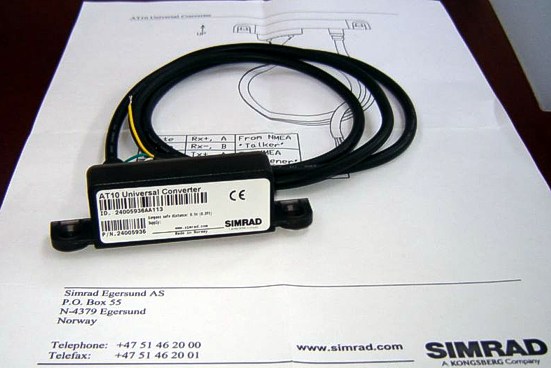 ------------- Thomi |
Posted By: tobo
Date Posted: 07 January 2008 at 20:12
|
Dear Andis The best Navtex station for the North sea and the Baltic sea is Pinneberg which started in 2006. From this station you get weather forcasts in German. But there are e few more stations in Scandinavia like Stockholm Radio, Harnosand, Karlskrona or in Norway Bodo Radio, Rogaland Radio, Vardoe Radio and Svalbard sending in English. Originally these stations were not meant to send weather reports (type E) but as GMDSS grew and lots of VHF-stations stopped sending, these Navtex stations expanded or will expand their service. If you like proper forcasts over a few days (max. 5) you should consider buying i.e. NASA Clipper 147 or NASA Weatherman which receives reports of the DWD (Deutscher Wetter Dienst) on 147,3 kHz. Costs around EUR 400.00 , the activ antenna can also be mounted on the rails. If you want to combine both services I recommend the MRD 80 with timer and printer (EUR 1800.00). ------------- Thomi |
Posted By: Johan Hackman
Date Posted: 08 January 2008 at 11:44
|
Thanks, Thomi! That's very useful information. I will take a look at the NASA Weatherman too.
Johan ------------- http://www.johanhackman.se" rel="nofollow - http://www.johanhackman.se |
Posted By: leemind
Date Posted: 08 January 2008 at 14:24
|
Slightly different tack [sic] but here is another interesting product, if you have a computer on board. It is a Navtex rx, that plugs into a USB port and displays the messages in any browser, so no additional s/w required. It has internal batteries so doesn't need the computer to be on and they last about 3 days (and get charged when the computer is on or via any USB type charger) http://www.mesltd.co.uk/product_info.php?products_id=1123 - http://www.mesltd.co.uk/product_info.php?products_id=1123 It works as advertised and I'm pretty happy with it. If you want any more info just ask! Cheers D. ------------- Grand Cru Hanse 461#028 |
Posted By: Gregor
Date Posted: 08 January 2008 at 17:37
|
Hello,
I have a Icom PCR-1500 (it's now 4 sale..), but find it quit a hassle to operate it with my laptop. I was thinking of a navtex and weather fax unit in one piece. Anyone who has a suggestion of a unit that has both functions? Greetz, Gregor |
Posted By: Charlie
Date Posted: 08 January 2008 at 19:59
|
hi
http://www.frisnit.com/navtex/ - http://www.frisnit.com/navtex/
here is a link to a really cool navtex engine. you will need SSB to drive it, but it is fun to see all the messages in one place.
i know it is a bit "geeky" but ..... enjoy!
charlie.
|
Posted By: Gregor
Date Posted: 08 January 2008 at 20:58
|
Hi, I know Frisnit, indeed a bit "geeky". I used it with pcr-1500 however, all those programms on the laptop, including navigation software, does not create a stable situation. A combination of these instruments would make a more reliable situation, I think. Greetz, Gregor |
Posted By: Andis
Date Posted: 09 January 2008 at 00:00
|
Hi Leemind.
Had a look on your link and it seems interesting. As I understand it has an internal antenna, will that be good enough when posisioned inside, near the chart table? ------------- S/Y Anne-Ma, Hanse 370 2007 |
Posted By: ernol
Date Posted: 09 January 2008 at 07:24
|
Hi, Is there anyone with experience with a Nasa Targer HF3/W. It is much cheaper as a ICOM 1500 PCR. Thanks
Erno
|
Posted By: leemind
Date Posted: 09 January 2008 at 08:07
|
Andis, In a word 'yes' . Navtex is broadcast on 490/518kHz - low end of the medium wave and much less affected by positioning than your VHF (~150MHz) antenna. In fact I received stuff when the box was sitting at home in central London. That is one advantage of the box, you can take it with you anywhere and keep it charged and receiving messages ready for your passage.
------------- Grand Cru Hanse 461#028 |
Posted By: tobo
Date Posted: 09 January 2008 at 10:19
There is an antenna indead and a very powerful one. So called H-Field antenna that can be mounted on the rails, but as I said playing around under deck already showed best results. This is what you get in a package by furuno.
------------- Thomi |
Posted By: John Allison
Date Posted: 09 January 2008 at 11:40
|
Hi Guys,
Think I picked this up on a SSB radio course but the frequencies used for Navtex lend themsleves to a horizontal (as opposed to vertical) antenna. Lots of people only have a wire antenna coming from the unit and running along horizontally inside the yacht - and they claim this works fine.
Cheers
JOHN ------------- No longer a Hanse owner - but loved the one we had! |
Posted By: ernol
Date Posted: 09 January 2008 at 16:21
Som general Navtex info.
NavtexFrom Wikipedia, the free encyclopedia http://en.wikipedia.org/wiki/Image:Navtex.jpg"> 
http://en.wikipedia.org/wiki/Image:Navtex.jpg - - A NAVTEX receiver prints an incoming message.NAVTEX is an international automated http://en.wikipedia.org/wiki/Medium_frequency - medium frequency direct-printing service for delivery of navigational and meteorological warnings and forecasts, as well as urgent marine safety information to ships. It was developed to provide a low-cost, simple, and automated means of receiving this information aboard ships at sea within approximately 370 km (200 nautical miles) of shore. http://en.wikipedia.org/w/index.php?title=United_States_Coast_Guard_Radio_Stations&action=edit - NAVTEX stations in the U.S. are operated by the http://en.wikipedia.org/wiki/United_States_Coast_Guard - United States Coast Guard . There are no user fees associated with receiving NAVTEX broadcasts. Where the messages contain weather forecasts, an abbreviated format very similar to the http://en.wikipedia.org/wiki/Shipping_forecast - shipping forecast is used. NAVTEX is a component of the http://en.wikipedia.org/wiki/International_Maritime_Organization - International Maritime Organization / http://en.wikipedia.org/wiki/International_Hydrographic_Organization - International Hydrographic Organization http://en.wikipedia.org/w/index.php?title=Worldwide_Navigation_Warning_Service&action=edit - Worldwide Navigation Warning Service (WWNWS). NAVTEX is also a major element of the http://en.wikipedia.org/wiki/Global_Maritime_Distress_Safety_System - Global Maritime Distress Safety System (GMDSS). http://en.wikipedia.org/wiki/International_Convention_for_the_Safety_of_Life_at_Sea - International Convention for the Safety of Life at Sea (SOLAS) mandated certain classes of vessels must carry NAVTEX, beginning August 1, 1993. NAVTEX receivers which are approved for GMDSS contain an internal printer and cost between $800-$1500. A new generation of NAVTEX receivers intended for non-GMDSS applications such as the recreational community is now entering the marketplace. These receivers include features such as http://en.wikipedia.org/wiki/LCD - LCD screens and http://en.wikipedia.org/wiki/RS-232 - RS-232 output and have a purchase price in the $300-$500 range. In the UK they can be purchased for £115.
[ http://en.wikipedia.org/w/index.php?title=Navtex&action=edit§ion=1 - edit ] NAVTEX Message FormatNAVTEX messages are transmitted using binary http://en.wikipedia.org/wiki/Frequency-shift_keying - frequency-shift keying (BFSK) at 100 bit/s and a 170 Hz frequency shift. The characters are encoded using the 7-bit CCIR 476 character set and basic error detection is enabled by employing http://en.wikipedia.org/wiki/Forward_error_correction - forward error correction (FEC). This is the same format as the SITOR-B ( http://en.wikipedia.org/wiki/AMTOR - AMTOR ) format. Every NAVTEX message is preceded by a phasing signal of around ten seconds then a start of message group, "ZCZC", followed by four characters B1, B2, B3 and B4. B1 is an alpha character identifying the station, and B2 is an alpha character used to identify the subject of the message. Receivers use these characters to reject messages from certain stations or if the message contains subjects of no interest to the user. B3 and B4 are two-digit numerics identifying individual messages, used by receivers to keep already received messages from being repeated. A message containing the B1,2,3,4 characters of 'FE01' from a U.S. NAVTEX Station indicate that this is a weather forecast message from Boston MA. NAVTEX message example: (start of phasing signals >=10 seconds) ZCZC B1,B2,B3,B4 Time of message transmission in UTC (optional) Message Text ... NNNN (end of message phasing signals for >=5 seconds before next message) [ http://en.wikipedia.org/w/index.php?title=Navtex&action=edit§ion=2 - edit ] Start of messageZCZC begins the message. [ http://en.wikipedia.org/w/index.php?title=Navtex&action=edit§ion=3 - edit ] Transmitter identity (B1)This character defines the transmitter identity and its associated coverage area. [ http://en.wikipedia.org/w/index.php?title=Navtex&action=edit§ion=4 - edit ] Subject indicator character (B2)The subject indicator character is used by the receiver to identify different classes of messages below. The indicator is also used to reject messages concerning certain optional subjects which are not required by the ship (e.g. http://en.wikipedia.org/wiki/LORAN - LORAN C messages might be rejected in a ship which is not fitted with a LORAN C receiver). NAVTEX broadcasts use following subject indicator characters:
Note: Receivers use the B2 character to identify messages which, because of their importance, can not be rejected (designated by a 1). The subject indicator characters B, F and G are normally not used in the United States since the http://en.wikipedia.org/wiki/National_Weather_Service - National Weather Service normally includes meteorological warnings in forecast messages. Meteorological warnings are broadcast using the subject indicator character E. U.S. Coast Guard District Broadcast Notices to Mariners affecting ships outside the line of demarcation, and inside the line of demarcation in areas where deep draft vessels operate, use the subject indicator character A. [ http://en.wikipedia.org/w/index.php?title=Navtex&action=edit§ion=5 - edit ] Serial number of message (B3, B4)These two characters define the serial number of each B2 message type (class). Generally serial numbers start with the numbers '01', however in special circumstances, the numbers begin with '00'. This forces the receiver to print the message. [ http://en.wikipedia.org/w/index.php?title=Navtex&action=edit§ion=6 - edit ] Time of originThe time of the transmission of the message is in UTC. [ http://en.wikipedia.org/w/index.php?title=Navtex&action=edit§ion=7 - edit ] Message textThe full text of the message follows. [ http://en.wikipedia.org/w/index.php?title=Navtex&action=edit§ion=8 - edit ] End of messageThe end of the message is asserted when the characters "NNNN" are received. [ http://en.wikipedia.org/w/index.php?title=Navtex&action=edit§ion=9 - edit ] Technical InformationNAVTEX broadcasts are primarily made on http://en.wikipedia.org/wiki/MF - Medium frequencies of 518 kHz or 490 kHz and using narrow-band direct printing (NBDP), 7-unit forward error correcting (FEC or, Mode B) transmission and the CCIR-476 character set. This type of transmission is also used in http://en.wikipedia.org/wiki/Amateur_radio - Amateur radio , where it is known as http://en.wikipedia.org/wiki/AMTOR - AMTOR . AMTOR Broadcasts use 100 baud FSK modulation, with a frequency shift of 170 Hz. The international NAVTEX frequency is 518 kHz USB. Regional transmission of NAVTEX uses 490 kHz specifically for broadcasts in local languages other than English. It is not used in the U.S. NAVTEX-type Marine Safety Information (MSI) transmissions also take place on http://en.wikipedia.org/wiki/HF - HF at 4209.5 kHz using FEC mode. [ http://en.wikipedia.org/w/index.php?title=Navtex&action=edit§ion=10 - edit ] Message ReceptionCommercial receivers are available for installation into vessels. These are designed to operate unattended and either record messages on to paper or to the receiver's internal memory for later review. There are also a number of software packages available allowing messages to be decoded by a PC with a suitable receiver connected to the computer's soundcard. Any general communications receiver capable of audio reception at 518 kHz or 490 kHz http://en.wikipedia.org/wiki/Single_sideband - single sideband can be used. [ http://en.wikipedia.org/w/index.php?title=Navtex&action=edit§ion=11 - edit ] NAVTEX via InternetSome organisations have gateways through which web users can access the NAVTEX bulletins using a browser:
[ http://en.wikipedia.org/w/index.php?title=Navtex&action=edit§ion=12 - edit ] Mediahttp://en.wikipedia.org/wiki/Image:Navtex_transmission_example.ogg - A sample NAVTEX transmission < title="Play " style="WIDTH: 180px; TEXT-ALIGN: center" ='wgOggP.init(false, {"id": "ogg_p_1", "videoUrl": "http://upload.wikimedia.org/wikipedia/en/9/93/Navtex_transmission_example.ogg", "width": 180, "height": 0, "length": 16, "Url": "/wiki/:Navtex_transmission_example.ogg", "isVideo": false});'> The text "Welcome to Wikipedia, the free encyclopedia that anyone can edit." sent in NAVTEX format.
Problems listening to the file? See http://en.wikipedia.org/wiki/Wikipedia:Media_help - media help . [ http://en.wikipedia.org/w/index.php?title=Navtex&action=edit§ion=13 - edit ] Sources
NAVTEX MF Transmitters
NAVTEX decoders
Retrieved from " http://en.wikipedia.org/wiki/Navtex - http://en.wikipedia.org/wiki/Navtex " |
Posted By: Nereide
Date Posted: 10 January 2008 at 11:54
|
Hi Guys,
I believe the reference in this area is Frank Singleton.
There is much material to be read,...
http://www.franksingleton.clara.net/ - http://www.franksingleton.clara.net/
the choice of hardware in this area is somewhat painful given the different limitations and requirements to maximize performance.
i personally have weatherman and navtex from Nasa,
a sangean 909 for radio / weatherfax running on Mscan: results have been good (receive Pinnenburg in south of France) but still missing the ideal antenna solution to make this a more permanent set-up. thought is still in progress as i'm missing AIS engine that requires VHF antenna input. RF do a DX 500 that splits VHF from S,M,LW in one antenna,...
I actually considered putting in a HF3 or even a PC R 1500 ; but as mentioned above there are pros and cons for either.
stephen
|
Posted By: Nereide
Date Posted: 10 January 2008 at 12:30
|
Navtex related issues :
http://www.franksingleton.clara.net/navtex.html - http://www.franksingleton.clara.net/navtex.html
Hardware/software related :
http://www.franksingleton.clara.net/rtty.html - http://www.franksingleton.clara.net/rtty.html
|