3. party wind transducer for Simrad IS15
Printed From: myHanse.com
Category: General
Forum Name: Chit Chat
Forum Description: Talk about anything to do with your boat
URL: https://www.myhanse.com/forum_posts.asp?TID=5349
Printed Date: 27 March 2026 at 03:40
Software Version: Web Wiz Forums 12.06 - https://www.webwizforums.com
Topic: 3. party wind transducer for Simrad IS15
Posted By: PRCH
Subject: 3. party wind transducer for Simrad IS15
Date Posted: 24 July 2011 at 09:07
|
I think that several of us have experienced problems with the discontinued Simrad IS15 wind transducer. On Ebay I have found this item: http://cgi.ebay.co.uk/Universal-Wind-Transducer-Garmin-Simrad-Cetrek-/270719089717 - http://cgi.ebay.co.uk/Universal-Wind-Transducer-Garmin-Simrad-Cetrek-/270719089717  Has any of you experience with this unit? ------------- Regards Peter ————————————————— S/Y Schisslaweng, Hanse 312, #212 |
Replies:
Posted By: PALM
Date Posted: 13 August 2011 at 18:39
|
Nasamarine.com also has a wind transducer sending
NMEA. Price 120£.
http://www.nasamarine.com/proddetail.php?prod=01_Mast_Head_Unit - http://www.nasamarine.com/proddetail.php?prod=01_Mast_Head_Unit ------------- //Petter Almhagen S/Y Elsanta Hanse 342 #223 Gothenburg, Sweden |
Posted By: Johan Hackman
Date Posted: 13 August 2011 at 19:20
|
I am not sure it would work with a third party transducer. From what I have heard, the IS15 Wind only works with Simrad's own transducer. I think it is worth checking up before making a purchase.
It is an altogether different thing if the system is NMEA2000, like Simrad IS12 and IS20. Then you can use any NMEA2000 wind sensor, but you will run into some calibration problems that I have written about http://www.myhanse.com/forum_posts.asp?TID=5000 - in this thread . The IS15 network is called Roblink which is NMEA0183. It lacks the "plug-and-play"-compatibility. Johan -------------  http://www.johanhackman.se" rel="nofollow - http://www.johanhackman.se |
Posted By: PRCH
Date Posted: 13 August 2011 at 21:17
|
Hi Palm and Johan
Thank you very much for your replies. The reason for my eager to get the IS15 wind to work is that it it in a system with a IS15 Combi instrument. If I change the IS15 wind with a different system, Simrad or not, it will not be able to "talk" with my IS15 combi since no new wind system will "talk" Roblink. Any way I most likely will have to accept that and get me a new wind system. Any suggestions are very welcome. ------------- Regards Peter ————————————————— S/Y Schisslaweng, Hanse 312, #212 |
Posted By: PALM
Date Posted: 04 August 2013 at 23:48
|
I have bought the nasamarine.com nmea mast head unit ( http://www.nasamarine.com/proddetail.php?prod=31_NMEA_Masthead ) since my IS15 Wind transducer broke. The IS15 Wind can read nmea if it has SW revision 1.6. The setting must be changed to nmea=listener. If the IS15 Kombi (speed logg) is connected with roblink to the IS15Wind, it show both true wind and direction. There was only 2 issues with the installation, first to get the IS15 to read nmea, and then to route the cable from the mast foot to the IS15 Wind. My installation: The mast head unit was fixed at the mast top and the cable routed to the mast foot. The cable has 3 connections, 12V feed, ground and nmea out. The 12V feed did I connect to the unused deck lamp supply (orange). It is also possible to use the supply for the saloon front reading lamp. I used the two roblink cables for nmea+ and ground to get the signal from the mast foot to the E-panel. In the E-panel I connected this end of the roblink cable to the free unused signal cables routed from E-panel to the IS15 Wind, where it was connected to the nmea port. The trick to make the IS15 Wind to read the nmea signal is to connect the ground/nmea- to the electric ground somewhere between the mast head unit and the IS15 Wind (the ground voltage level seems a bit high on the internal ground in my IS15 Wind instrument). With this 125£ solution I will continue to use the Simrad IS15 crap until it die, and then never Simrad again. Edit 2014-10-03. I have used this combination, nasamarine.com nmea mast head unit together with IS15 for two seasons now. The combination is working!  One small issue still to be solved. The calibration of the nasamarine.com nmea mast head unit is done by: 1. keep the wind vane in Zero-direction, 2. connect blue (signal) cable to ground (black), 3. power upp, 4. release the blue cable from ground. My IS15 has low resistance between nmea + and - during power up => the nasamarine.com nmea mast head unit is recalibrating at every power up.  I have discussed the issue with nasamarine.com and the solution is to put a pull-up resistor between the nmea mast head unit red (+) and blue (signal) cable. The restior shall be at 10kOhm. This will keep the signal high during power up, but shall not be enough to keep the signal high when the IS15 is up and running.
To be tested during summer 2015.  ------------- //Petter Almhagen S/Y Elsanta Hanse 342 #223 Gothenburg, Sweden |
Posted By: PRCH
Date Posted: 06 August 2013 at 19:11
|
Hi Palm Thank you very much for your helpful information. I will order a NASA masthead unit and mount it this winter when the mast is vertical  Looking forward to post my experience next spring. Happy sailing to all of you. ------------- Regards Peter ————————————————— S/Y Schisslaweng, Hanse 312, #212 |
Posted By: PALM
Date Posted: 06 August 2013 at 21:23
The picture show the metal bracket that I made for fixing the Nasamarine mast Head unit. I used the same holes in the mast as used with Simrad transducer. The black plastic brackets for fixing the mast Head unit to my bracket are enclosed in the package from Nasamarine, even if it is not stated in the specification.  ------------- //Petter Almhagen S/Y Elsanta Hanse 342 #223 Gothenburg, Sweden |
Posted By: mick the boat
Date Posted: 02 January 2014 at 19:17
|
Hi Palm, I have read your message with much interest, I have the same problem the SIMRAD IS15 mast head wind unit broken, I have purchased the NASA NMEA masthead wind vane and I am attempting to connect to the Simrad IS15 multi instrument tranceiver box . I have connected the Nasa 3 wires, the Black wire (negative ground to the Simrad black) , the Nasa Red wire (positive to power ), the Nasa Blue wire (nmea to the Simrad Red ) to the Red & Black wires of 5 wire Simrad cable but wind the instrument does not function , I am obviously not making the correct connections, do you please have any advice for me the correct way. Kind Regards, Mike Hodges. S Y Star Challenger, Victory 40. |
Posted By: PALM
Date Posted: 03 January 2014 at 15:30
|
Mike, I think you have the same issue with voltage level at the grounding as I had. Make a test by adding an additional grounding cable from the wind tranducer black directly to good grounding (battery minus). I have this grounding permanently from mast foot to the main grounding behind the control panel. /Petter ------------- //Petter Almhagen S/Y Elsanta Hanse 342 #223 Gothenburg, Sweden |
Posted By: rodstar_2000
Date Posted: 07 October 2014 at 22:29
|
Hi, I have a Simrad IS15 wind vane and a Simrad IS20 Analog Display for wind data. The Simrad support team told me that both are incompatibles, but here at the forum some of you wrote that IS15 talks NMEA 0183 (is Roblink NMEA 0183??). As I bought the IS15 at ebay without cable, I would like to ask you guys, if someone has the pinage/schematic of IS15 cable. I think that it should have power (+ and -) and NMEA out (+TX and -TX). The IS 15 wind vane has a 4 pins male plug . Does anyone can help? Thanks a lot!! rodrigo ------------- _~ _~ )_)_~ )_))_))_) _!__!__!_ \______t/ ~~~~~~~~~~~~~ Rodrigo / Brazil |
Posted By: rodstar_2000
Date Posted: 09 October 2014 at 09:56
|
Hi folks, here are some photos from Simrad IS15 wind transducer "teardown". Just popped up the top and the bottom and the show started. The important thing is: just to wires from the main board to the socket. But the socket has 4 pins. My guess was 2 of them are useless/off. What are these 2 wires? +tx and -tx? +12v and ground?  Simrad IS15 top sensor 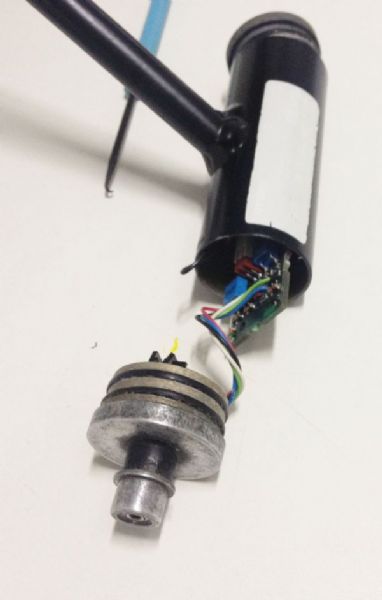 Simrad IS15 bottom sensor. Cut 3 wires for soldering a plug in the future.  Simrad IS15 main board. Just have 2 wires to connect to Roblink (black and red)  Simrad IS15 main board. Roblink wires unplugged.  Simrad IS15 tube internal view. Roblink wires thru the arm tube. 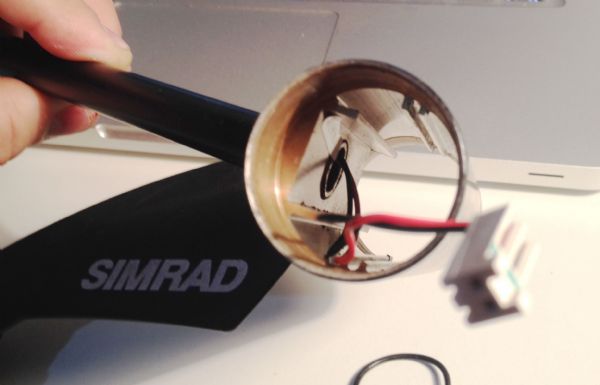 Simrad IS15 main board close  The multi test indicates the following connections:  ------------- _~ _~ )_)_~ )_))_))_) _!__!__!_ \______t/ ~~~~~~~~~~~~~ Rodrigo / Brazil |
Posted By: gord0001a
Date Posted: 28 June 2015 at 15:38
|
I know this thread is long since dead, but I'm hoping their are some IS15 experts kicking around that can help me with a few questions. I recently picked up an IS15 wind instrument and MHU for $100, and need some help with the wiring. The masthead wiring has bare wires but nothing else. I'm pretty sure I can rig up connectors (unless somebody has spares they'd like to sell!) for the back of the instrument panel, but what I need are pinouts for the MHU and instrument itself. Appreciate any assistance! Sorry for the thread jack/zombie thread! :-) Thanks, Gord.
|
Posted By: Galbizua
Date Posted: 26 July 2025 at 17:28
|
 PALM wrote:
Posted By: Galbizua
Date Posted: 26 July 2025 at 17:34
|
Hello I made connection like picture But not work. It is the nasa marine wind vane with 3 cable 12v red, black -, nmea 183 blue. I connect the black with black nmea and the blue with the read NMEA but don’t work I try with different negative but same result Any idea? Thank you
|
Posted By: Galbizua
Date Posted: 26 July 2025 at 17:35
|
I do the same! Did you solve the problem? Can you help me
|
Posted By: PALM
Date Posted: 26 July 2025 at 22:52
|
Hi, I use the nasamarine nmea0183 wireless mast head unit since many years now. Check the signal with OpenCPN or other SW that can show nmea0183 data. If the data is ok, you check the setting of the SIMRAD unit. ------------- //Petter Almhagen S/Y Elsanta Hanse 342 #223 Gothenburg, Sweden |