myHanse Upgrade
Printed From: myHanse.com
Category: myHanse Notices
Forum Name: Announcements from Hanse
Forum Description: Information and Updates from Hanse
URL: https://www.myhanse.com/forum_posts.asp?TID=800
Printed Date: 27 March 2026 at 01:44
Software Version: Web Wiz Forums 12.06 - https://www.webwizforums.com
Topic: myHanse Upgrade
Posted By: Webmaster
Subject: myHanse Upgrade
Date Posted: 01 October 2006 at 16:53
|
I have just completed a major upgrade to both the site and the software that runs the site.
If you get any problems please let me know.
Thanks,
Jonathan
Webmaster |
Replies:
Posted By: Brightside
Date Posted: 01 October 2006 at 20:11
|
Hi Jonathan.
I see that posted photos are vertically cropped. Nice new look. Regards Mike |
Posted By: Popeye
Date Posted: 01 October 2006 at 21:32
|
Has the text become smaller. At least on my post on the 370 thread water in bilges the new text is smaller than the old posts. And I don't get pictures as pictures, only as a jpg link that needs clicking for activation. Is this correct?
See my post at 22:17 on the 370 water in bilges thread for more ramblings. ------------- Popeye the sailorman |
Posted By: Clivian
Date Posted: 01 October 2006 at 23:40
|
Ohhhh Jonathon
The font is sooooo small - my poor old eyes they are a struggling.
Like the new look - But bigger letters please.
Sue (where are the smiley faces???)
|
Posted By: Webmaster
Date Posted: 02 October 2006 at 08:24
|
Hi Guys,
I will look at increasing the test size.
 Am not sure what the issue was with image upload. Above is a test I have just done but let me know how you get on. With Images you can now not only insert new ones but re-use the ones you have uploaded.
I have also noticed this morning that the rank system icons are not working. Will try and address this today.
JT
|
Posted By: Webmaster
Date Posted: 02 October 2006 at 08:29
|
Font size now increased.
Better?
|
Posted By: Abstinenz
Date Posted: 02 October 2006 at 08:40
|
Hi Jonathan.
Above from allready mentioned font size, did'nt you forget something regional
 /Steen
|
Posted By: John Allison
Date Posted: 02 October 2006 at 09:23
|
Nice crisp new look Jonathon - thank you.
JOHN ------------- No longer a Hanse owner - but loved the one we had! |
Posted By: colincooper
Date Posted: 02 October 2006 at 10:24
|
Thanks for the upgrade. Looks great. And thanks for giving us owners such a great resource. ------------- Colin (owner of Hilde - a 370) |
Posted By: Brightside
Date Posted: 02 October 2006 at 15:03
|
Hi Jonathan.
At work the photos load up OK. At home only the top say 25% of the picture shows with a scroll bar. But the scroll bar only allow me to see another 5% of the photo. System at home Win 98SE via dial-up modem. Regards Mike |
Posted By: Webmaster
Date Posted: 02 October 2006 at 15:16
|
Hi Brightside,
Am not sure what we can do if it is not working on Windows 98 as it is not supported any longer.
What version of IE are you running?
|
Posted By: Popeye
Date Posted: 02 October 2006 at 21:11
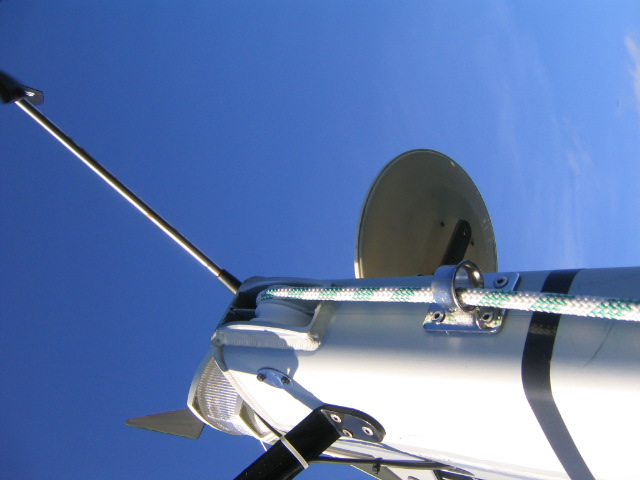
this is a test ... I give in ... same PC ... different day ... and piccy upload goes fine ... but ... I do notice that the Insert Image icon is now a tree on a blue square, and yesterday it was not such...... anyhow I am happy
for the boat-nerds out there (assuming everyone accepts nerds as a positive word) the picture is of my spinnaker halyard guide just above the black band on the mast which has resulted in my gennaker flying 2 meters up from the deck....my North sailmaker has used a North database with a I-measurement that assumes the halyard comes thro a guide just above the forestay..... but not om my boat ...
and Sue... the happy faces are still there ... but don't use the Quick Reply thingy that is at the bottom of each thread, you have to go inside the last post and click on the icon in the upper RH corner ("Reply") which then gives you access to the good old full-blown reply box
------------- Popeye the sailorman |
Posted By: Popeye
Date Posted: 02 October 2006 at 21:22
|
sorry ... wot an idiot I have been ... I now see that the Reply button within the last post generates the usual reply window ... and that yesterday in the shock of the new system and small font I have have use the icon for file upload (idiot!) which is parked just beside the tree on the square icon for image upload
and Sue.... by chance I discovered that the lonely happy face in the Quick Reply launches a big selection of faces ...  ------------- Popeye the sailorman |
Posted By: Brightside
Date Posted: 02 October 2006 at 23:30
|
Hi Jonathan
Running IE6 Mike |
Posted By: Clivian
Date Posted: 03 October 2006 at 08:42
|
Popeye The lonley little face does not want to play on my computer for some reason. Sue :-( |
Posted By: Webmaster
Date Posted: 03 October 2006 at 14:39
|
I have moved the talk about the 400 to the correct forum and created a new topic. Just makes it easyer for me to track problems without 400 talk in the middle
Jonathan
Webmaster |
Posted By: Popeye
Date Posted: 03 October 2006 at 20:22
|
Keep up the good work Jonathan !
And I really like my Captians stripes !  ------------- Popeye the sailorman |
Posted By: Brightside
Date Posted: 03 October 2006 at 21:05
|
1 Hi Webmaster.
2 This is a test using 25 lines of text. 3 Regards Mike. 4 5 6 7 8 9 10 11 12 13 14 15 16 17 18 19 20 21 22 23 24 25. End of text test. |
Posted By: Brightside
Date Posted: 03 October 2006 at 21:10
|
Hi Webmaster.
Of the last posting @ 21:05 only lines 1 to 11 inclusive are visable to me. Looking at historical postings it seems only 11 lines of text are visable to me. Using Win 98SE. Regards Mike |
Posted By: Webmaster
Date Posted: 04 October 2006 at 08:12
|
Hi Brightside,
Can you provide me with two bits of information.
1) The exact version of IE you are running on your W98 machine (In IE go to Help -> About Internet Explorer). The forum software reports you are running Windows 95 IE5 and I thought you said 6 [Windows 98 IE 5]).
2) A screen shot of the issue. To do this open the forum page and scroll down to the issue. When it is on screen press Print Screen on your keyboard. If you then go into your email program and start a new email and do edit -> paste and the screen shot should appear. If you can email this to webmaster @ myhanse etc etc
I can then forward this to the people who develop the core software.
Thanks,
Jonathan
Webmaster Jonathan
|
Posted By: susie
Date Posted: 04 October 2006 at 15:09
|
Hi,
The new layout looks really great!
Thank you!However, I was wondering if it would be a good idea to organize the site into subjects such as "sails", "engine", "electronics" etc.
Currently all these subjects are discussed in various locations, making it really hard to keep track and find the discussion later.
Best regards,
Susanne |
Posted By: Webmaster
Date Posted: 04 October 2006 at 15:16
|
Hi Susanne,
Thanks for you comments.
I did think a while back about changing the site but in the end I decided that we should have a section for each boat and if something was more general it should be under the chit chat section.
I may re-visit this at some time in the future...
Jonathan
Webmaster |
Posted By: Brightside
Date Posted: 12 October 2006 at 22:20
|
Test using FireFox Internet Browser. 20 Lines of text.
2 3 4 5 6 7 8 9 10 11 12 13 14 15 16 17 18 19 20 End of TEST |
Posted By: gertha
Date Posted: 14 October 2006 at 18:47
|
As I type , if I hit a letter with an icon with the letter as its first letter, the icon lights up and screen moves, also I keep getting loged out when I press return and if I type (help) I get fired to the help menu.
All new tricks since this upgrade.
Simon
|
Posted By: Clivian
Date Posted: 22 October 2006 at 20:13
|
Jonathon
For some reason I am unable to open the link that enables me to post a picture - any ideas.
 Sue
|
Posted By: Webmaster
Date Posted: 23 October 2006 at 09:00
|
Hi Sue,
Do you get this in all forums?
Can you send me a private message with how you are trying to do it (the steps you go through).
Thanks,
Jonathan
Webmaster |
Posted By: gertha
Date Posted: 27 October 2006 at 22:02
|
Is there any on out there.
I can not type, without all the icons flashing and moving.
|
Posted By: gertha
Date Posted: 27 October 2006 at 22:03
| I have tried typing (help) but this blows my puter |
Posted By: gertha
Date Posted: 27 October 2006 at 22:05
|
Further to my request of a couple of weeks ago and now, typing on this forum is a joke.
simon
|
Posted By: gertha
Date Posted: 27 October 2006 at 22:08
| You all owe me a few tickets to the essex boat show, as I can not write on this forum without lights flashing. |